

so far top notch!could not beat price,time will tell longevity mounting on coon rifle
Ships from Stockbridge, GA · Most in-stock orders ship within 1 business day · Call 1-800-547-3050
Wholesale and bulk pricingMost in-stock orders ship within 1 business dayCall 1-800-547-3050Wholesale and bulk pricing
Call or text a person
Call 1-800-547-3050Text 1-833-419-2192support@18650batterystore.comMonday to Friday, 9 AM to 5 PM Eastern
Other sizes
Other sizes: see allCell sizes
Household sizes
Which size do I have?
The number is the size. An 18350 is 18 mm across and 35 mm long; a 26650 is 26 mm across and 65 mm long.
18650 sizing explainedCan't find your size? Call 1-800-547-3050
Learn
Learn: overview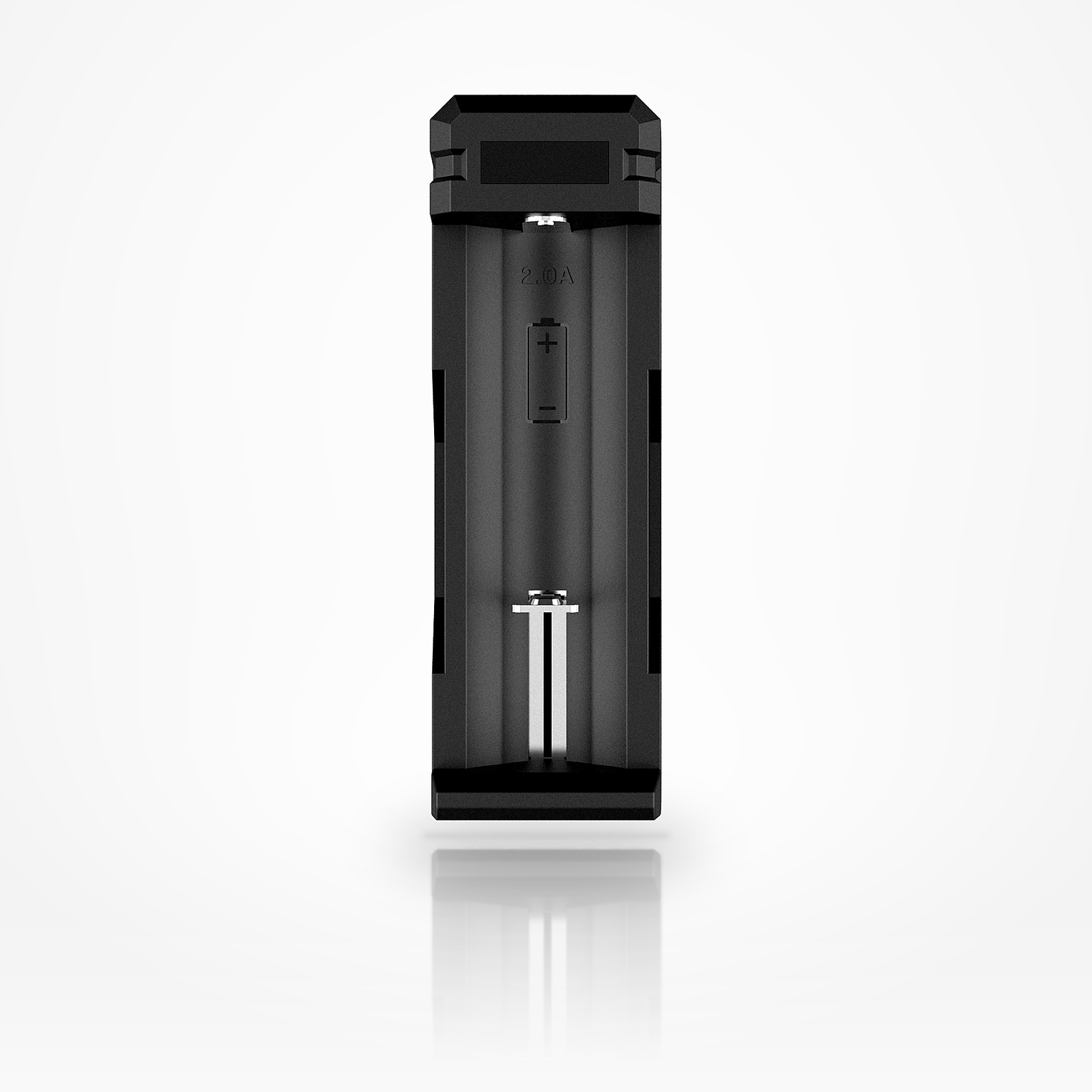


A one-slot USB-C charger for 3.6/3.7 V lithium-ion cells from 18650 to 26650: a single 2 A constant current, ending at 4.2 ± 0.05 V, on a 5 V 2.1 A input [1]. Below: every rating XTAR prints with its condition, what the light means, which of our cells can take 2 A, and charge times we calculated, so you can check each number.
The manual lists 3.6/3.7 V lithium-ion cells in six sizes, 18650 to 26650 [1]. XTAR lists no smaller sizes, such as 14500 or 16340, and no Ni-MH or LiFePO4. Don’t use it for those, or for alkaline cells.
01SPEC PLATE
XTAR prints the SC1’s ratings in its user manual [1] (the 2024 USB-C version), in a specification table on its SC1 page [2] and in its charger chart [3]. The manual comes first, copied as printed; then what the page and chart add, where they differ, and our arithmetic. Each row names its source or shows its formula.
| SPECIFICATION | VALUE | CONDITION · SOURCE |
|---|---|---|
| RATED · MANUFACTURER copied from the manual’s specification table and text [1] | ||
| MODEL | SC1 | as printed [1] |
| INPUT | 5 V · 2.1 A | “5V 2.1A”; a USB-C port in the drawing [1] |
| CONSTANT CURRENT | 2 A | “2A×1” [1] |
| CUT-OFF VOLTAGE | 4.2 V | “4.2±0.05V” [1] |
| CUT-OFF CURRENT | ≤ 120 mA | “≤120mA” [1]; “< 150mA” on XTAR’s page [2] |
| OPERATING TEMPERATURE | 0 to 40 °C | “0-40℃” [1] |
| CELLS | 3.6/3.7 V | “3.6/3.7V rechargeable 18650/18700/20700/21700/22650/26650 Li-ion batteries.” [1] |
| OVER-DISCHARGED CELLS | Yes | “batteries that can be recovered will start charging within 10 minutes” [1] |
| + Source: [1] XTAR, SC1 (Type-C) User Manual, multilingual leaflet marked “V7” (file title dated 2024-01-06), English section: introduction, “Apply to”, Specification table, Operation, Battery Icon Meaning, Warning; in XTAR’s download library, listed as last updated 2024-01-31 · XTAR download page | ||
| SPECIFICATION | VALUE | CONDITION · SOURCE |
|---|---|---|
| FROM XTAR’S SC1 PAGE specification table and panels [2], as printed | ||
| TYPE-C INPUT | 5 V · 2.1 A | “5V 2.1A” [2] |
| CONSTANT CURRENT | 2 A | “2Ax1”; “2A Max Charge Current” [2] |
| CHARGE CUTOFF CURRENT | < 150 mA | “< 150mA” [2]; the manual prints ≤120 mA [1] |
| DIMENSION | 105 × 35 × 28 mm | “L105xW35xH28mm” [2] |
| NET WEIGHT | 38 g | [2] |
| XTAR’S CHARGE TIME | 1.25 h | “1.25 hrs to charge VTC5 2600mAh fully” [2] |
| IN THE BOX | Charger, cord, manual | “SC1 Charger, USB A to C Charging Cord, User Manual” [2] |
| FROM XTAR’S CHARGER CHART [3], as printed, where it differs from [1] and [2] | ||
| SIZES | 7 + protected | adds 25500 and “protected 20700/21700” [3]; the manual’s file title notes 25500 was removed [1] |
| SIZE | 105 × 35 × 39 mm | “W35x L105x H39mm” [3]; 28 mm high on XTAR’s page [2] |
| NET WEIGHT | 37 g | [3]; 38 g on XTAR’s page [2] |
| CALCULATED arithmetic on [1] and [2], shown so you can check it | ||
| CHARGE POWER | 8.4 W | 4.2 V × 2 A at the end of constant current; input 5 V × 2.1 A = 10.5 W [1] |
| 2 A ON A 3,000 mAh CELL | 0.67C | 2,000 mA ÷ 3,000 mAh |
| VTC5 AT 2 A | 1.3 h | 2,600 mAh ÷ 2,000 mA, constant current alone; XTAR prints 1.25 h [2] |
| + Source: [1] XTAR, SC1 (Type-C) User Manual, multilingual leaflet marked “V7” (file title dated 2024-01-06), English section: introduction, “Apply to”, Specification table, Operation, Battery Icon Meaning, Warning; in XTAR’s download library, listed as last updated 2024-01-31 · XTAR download page + Source: [2] XTAR, SC1 product page, xtar.cc: its feature list, “Specifications” table and image panels (charging, protections, recovery, compatibility, package contents, the earlier micro-USB version), retrieved 2026-10-31 · XTAR SC1 page + Source: [3] XTAR, XTAR Charger Range Comparison Chart, the SC1 and SC1 PLUS rows; 3 pages, no version printed; listed in XTAR’s download library as last updated 2024-01-21 · XTAR download page | ||
Orange band: the end-of-charge voltage, “4.2±0.05V” [1][2]; a charge can end anywhere inside it. Scale 4.10–4.30 V.
The current at which a charge ends, as each XTAR document prints it [1][2]. Neither says how it is measured. Scale 0–200 mA.
C-rate = 2,000 mA ÷ the cell’s printed capacity [C]: the share of its capacity per hour the SC1 puts in at constant current. A lower-capacity cell gets the same 2 A, so its C-rate is higher. Orange †: a cell whose printed charge limit is below 2 A (section 04). Marked > 15 °C or > 10 °C: a cell whose limit allows 2 A only in that range (section 04). Scale 0–1C.
The SC1 charges one cell at a time at 2 A constant current [1]. XTAR prints no lower current setting. Its page also lists “TC-CC-CV Smart Charging” and “Soft Start” [2]. Check that your cell’s printed limit allows 2 A (section 04); some allow it only when warm.
Data: “Constant Current 2A×1” [1] · black: the slot; gray: the same, as the SC1 has one slot · scale 0–4 A
03CHARGE TIME
Hours = capacity ÷ current, as if the whole charge ran at that current. A real charge from empty takes longer, because the current tapers in the constant-voltage finish, and a cell that isn’t empty needs less. Capacities are each cell’s own printed figure [C].
at full current, from empty
“2A×1” [1]
3,000 ÷ 2,000, at 2 A
“1.25 hrs to charge VTC5 2600mAh fully” [2]
| CELL | FORMAT | CAPACITY AS PRINTED, mAh [C] | HOURS AT 2 A |
|---|---|---|---|
| Samsung 25R | 18650 | 2,500 minimum | 1.3 |
| Samsung 30Q | 18650 | 3,000 nominal | 1.5 |
| Sony/Murata VTC6 | 18650 | 3,120 nominal | 1.6 |
| Molicel P28A | 18650 | 2,800 typical | 1.4 (> 10 °C) |
| Samsung 35E | 18650 | 3,350 minimum | 1.7 (at its limit) |
| Molicel M35A | 18650 | 3,450 typical | above its limit |
| EVE 33V | 18650 | 3,200 typical | 1.6 (> 15 °C) |
| Samsung 40T | 21700 | 4,000 minimum | 2.0 |
| Samsung 50E | 21700 | 4,900 minimum | 2.5 |
| Samsung 50S | 21700 | 5,000 typical | 2.5 |
| Molicel P50B | 21700 | 5,000 typical | 2.5 |
Hours = capacity ÷ current, from each cell’s printed capacity [C] and the SC1’s current [1]; scale 0–3 h. As if the whole charge ran at that current. No time is shown where the current is above the cell’s printed charge limit (section 04). The Samsung 35E’s 2 A time is at its printed limit, “2,000mA (not for cycle life)” (section 04). A time marked > 15 °C or > 10 °C holds only for a cell in that range: outside it, the cell’s printed limit is under this current (section 04).
Arithmetic, not a measurement. XTAR’s SC1 page says “1.25 hrs to charge VTC5 2600mAh fully” [2]; 2,600 ÷ 2,000 gives 1.3 h at constant current alone, longer than XTAR’s figure, and XTAR doesn’t print the cell’s starting charge. No time is shown for a cell whose printed charge limit is below 2 A: the Molicel M35A [C].
04COMPATIBILITY
The 2024 manual lists six 3.6/3.7 V lithium-ion sizes: 18650, 18700, 20700, 21700, 22650 and 26650 [1], and XTAR’s SC1 page prints the same six [2]. XTAR’s chart adds 25500 and protected 20700/21700 [3]; the manual’s file title notes that 25500 was removed [1]. Smaller sizes such as 14500 and 16340 aren’t listed in any of them. At 2 A, check each cell’s charge limit first, including any lower limit it prints for the cold.
Sizes exactly as printed: the manual [1] and XTAR’s SC1 page [2] list the first six; the chart [3] also lists the last two entries.
Bars: each cell’s printed charge limit [C], on a 0–6 A scale; limits above 6 A run to the edge, and every limit is written above its bar, with any lower limit the cell prints for the cold. Black mark: the SC1’s current [1]. Orange: a cell whose highest printed limit, the bar, is below it. 2 A is the Samsung 35E’s printed limit, “2,000mA (not for cycle life)” [C]. In the cold some printed limits are lower (chart figures are our reading). Sony/Murata VTC6: from 0 to below 10 °C its limit is “2.00A” (cell surface, for a charge that ends at 4.25 V or less), so 2 A equals it. Molicel P28A: at 0–10 °C its §4.14 chart allows 1.4 A in its specified region (the safe region stays at 2.8 A), so 2 A is above it. EVE 33V: its limit is “≤ 0.2C (620mA)” at “Charge: 0 to 15 °C” (cell surface), so 2 A is above it. At 1.0–3.0 V the Samsung 30Q, 35E, 40T, 50E and 50S guidelines allow at most 0.5C, which by our arithmetic is below 2 A for the 30Q and 35E [C]; [2] lists “TC-CC-CV Smart Charging” but not the trickle current or where it ends (section 06). Every verdict in fig 4.2 is for a cell from 0 to 40 °C; ten of the eleven cells print no charge range below 0 °C [C]. The SC1 has no lower setting, so charge a cell whose limit is below 2 A, such as the Molicel M35A, on a charger you can set lower. Let a cold cell warm up before you charge it (section 08). In the data table, each limit starts with the data sheet’s own row label; text in quotation marks is copied as printed, and notes after it are ours.
| CELL | FORMAT | CHARGE LIMIT AS PRINTED [C] | SC1 CURRENT ABOVE IT |
|---|---|---|---|
| Samsung 25R | 18650 | Rated charge: “CCCV, 4A, 4.20V, 100mA cut-off” (the spec prints no separate maximum charge current) | none |
| Samsung 30Q | 18650 | Rated charge: “CCCV, 4A, 4.20V, 100mA cut-off” (the spec prints no separate maximum charge current); pre-charge 0.1–0.5C at 1.0–3.0 V in its pack design guideline, at most 1.5 A (our arithmetic) | 2 A at 1.0–3.0 V (pre-charge limit 1.5 A) |
| Sony/Murata VTC6 | 18650 | Continuous Maximum Charge Current: “5.0A” (“Continuous”); “2.00A” from 0 to below 10 °C cell surface, for a charge that ends at 4.25 V or less (its 4.00 A figure needs one that ends at 4.15 V) | none |
| Molicel P28A | 18650 | Maximum charging current: “8.4A” (“See Section 4.14”); its §4.14 chart reaches 8.4 A only from 23 to 45 °C, in its safe region (5.6 A in its specified region); 2.8 A at 0–23 °C in its §4.14 chart’s safe region, and above 10 °C in its specified region; 1.4 A at 0–10 °C in its chart’s specified region (the safe region stays at 2.8 A); the chart figures are our reading | 2 A at 0–10 °C (specified region) |
| Samsung 35E | 18650 | Max. Charge Current: “2,000mA (not for cycle life)”; pre-charge 0.1–0.5C at 1.0–3.0 V in its pack design guideline, at most 1.7 A (our arithmetic) | 2 A at 1.0–3.0 V (pre-charge limit 1.7 A) |
| Molicel M35A | 18650 | Maximum charging current: “1.7 A” (“See Section 4.14”); its §4.14 chart, against cell surface temperature, stays at 1.7 A from 0 to 60 °C (our reading of the chart); Molicel’s older public data sheet prints 3.4 A, and this page uses the lower 1.7 A of Molicel’s newer specification | 2 A |
| EVE 33V | 18650 | Operation Temperature (Cell Surface Temperature): “≤ 1.0C (3100mA)” at “Charge: 15 to 50 °C”; “≤ 0.2C (620mA)” at “Charge: 0 to 15 °C” | 2 A at 0–15 °C |
| Samsung 40T | 21700 | Rated charge: “CCCV, 6A, 4.20 V, 100mA cut-off” (the spec prints no separate maximum charge current); pre-charge 0.1–0.5C at 1.0–3.0 V in its pack design guideline, at most 2 A (our arithmetic) | none |
| Samsung 50E | 21700 | Max. Charge Current: “4,900mA (not for cycle life)”; pre-charge 0.1–0.5C at 1.0–3.0 V in its pack design guideline, at most 2.45 A (our arithmetic) | none |
| Samsung 50S | 21700 | Max. charge current: “6A (continuous charge)”; pre-charge 0.1–0.5C at 1.0–3.0 V in its pack design guideline, at most 2.5 A (our arithmetic) | none |
| Molicel P50B | 21700 | Charge Current (70 °C cut-off), Maximum: “25 A” | none |
05INDICATORS
The SC1 has no screen. A four-bar battery icon at the top shows its state [1]; the table gives each state in the manual’s words.
| ICON | MEANING, AS PRINTED [1] |
|---|---|
| Flashing battery icon | “charging/activating” |
| Full battery icon | “standby / fully charged” |
| Flashing full battery icon | “polarity reversed” |
The manual doesn’t say what each bar stands for [1], so we can’t say what charge level each bar shows. XTAR’s page calls them “Straightforward LED Indicators” [2]. Take the cell out once the icon shows full and stops flashing.
06SAFETY
XTAR lists these for the SC1 [1][2], without a test method, so they appear as XTAR’s claims, quoted.
07COMPARE
The XTAR chargers in our store, each from its own XTAR manual, product page or chart [X]. The table quotes each one’s current as printed.
The highest per-slot current each charger’s XTAR manual, product page or chart prints [X], on a 0–3 A scale. Orange: the SC1. More current per slot shortens a charge; use it only where the cell’s printed limit allows it, which for some cells is lower in the cold.
| CHARGER | SLOTS | CURRENT AS PRINTED | MOST AT ONCE* | INPUT | CELL TYPES | DISPLAY |
|---|---|---|---|---|---|---|
| XTAR VC8 | 8 | 3Ax1 / 2Ax2 / 1Ax4 / 0.5Ax8 / 0.25A x 8 | 4 A | QC3.0 (5 V⎓2 A / 9 V⎓2 A), Type-C (manual); QC3.0 (5 V⎓3 A/9 V⎓2 A) on XTAR’s VC8 page | 3.6 V/3.7 V Li-ion/IMR/INR/ICR; 1.2 V Ni-MH/Ni-CD | LCD |
| XTAR SC2 | 2 | 3Ax1 / 2Ax2 | 4 A | QC3.0 (9 V⎓2 A/5 V⎓2 A), Type-C | 3.6/3.7 V Li-ion IMR/INR/ICR | LED indicator |
| XTAR DRAGON VP4L PLUS | 4 | 2A×2 (CH1&CH4) / 1A×4 / 0.5A×4 | 4 A | DC 12 V 3 A | 3.6 V/3.7 V Li-ion/IMR/INR/ICR; 1.2 V Ni-MH/Ni-CD; 11.1 V 3S Battery Pack | LCD |
| XTAR FC2 | 2 | 2A x 1 / 1A x 2 / 0.5A x 2 | 2 A | DC 5 V 2 A, Type-C | 3.6 V/3.7 V Li-ion/IMR/INR/ICR; 1.2 V Ni-MH | LED indicator |
| XTAR SC1 | 1 | 2A×1 | 2 A | 5 V 2.1 A, Type-C | 3.6/3.7 V rechargeable 18650/18700/20700/21700/22650/26650 Li-ion batteries | LED indicator |
| XTAR VC4 | 4 | 1A×2 (CH1 & CH4) / 0.5A×4 | 2 A | DC 5 V 2.1 A | 3.6 V/3.7 V Li-ion/IMR/INR/ICR; 1.2 V Ni-MH/Ni-CD | LCD |
| XTAR VC2 | 2 | 0.5A x 2 | 1 A | DC 5.0 V/1.0 A, Micro USB | 3.6 V/3.7 V Li-ion / IMR / INR / ICR | LCD |
| XTAR MC1 | 1 | 0.5A x 1 | 0.5 A | DC 5 V 0.5 A, Type-C | 3.6 V/3.7 V Li-ion/IMR/INR/ICR | LED indicator |
Current is copied as printed in each charger’s source [X], largest first; input and cell types are condensed from it. * Most at once: the largest current × slots among the rows XTAR prints, our arithmetic. Links go to each charger in our store.
08USE IT RIGHT
What the SC1 is for, and how to use it inside XTAR’s ratings and your cell’s limits.
Questions? Call 1-800-547-3050 or text 1-833-419-2192 to ask a person.
The manual [1] is XTAR’s USB-C version, linked as published (a multilingual leaflet; English is one panel). XTAR’s SC1 page [2] and charger chart [3] are linked too.
Ships from Stockbridge, GA. Most in-stock orders ship within 1 business day.
09QUESTIONS
Short answers. Where an answer comes from a document, it carries its source; the rest is standard handling practice. Anything else: call 1-800-547-3050 or text 1-833-419-2192.
The current SC1 does: its manual draws a USB-C input and XTAR’s page calls it the “Type-C” version [1][2]. XTAR’s page also shows an earlier SC1 with a micro-USB port [2]; this page follows the current version.
No. The manual and XTAR’s SC1 page list only 18650, 18700, 20700, 21700, 22650 and 26650 [1][2]; XTAR’s chart adds 25500 [3]. For small cells, choose a charger whose own page lists them.
The 2024 manual doesn’t mention protected cells [1]; XTAR’s chart lists protected 20700/21700 for the SC1 [3]. Call or text us before using one.
For a 3,000 mAh cell from empty, 1.5 h at 2 A by our arithmetic, plus a slower finish (section 03). XTAR’s page says “1.25 hrs to charge VTC5 2600mAh fully” [2].
Check its charge limit in section 04. Of the cells listed there, the Molicel M35A’s printed limit is below 2 A [C]; the Samsung 35E’s 2,000 mA is printed “not for cycle life” [C]. In the cold, 2 A is also above the limits of two others: the EVE 33V’s “≤ 0.2C (620mA)” at 0–15 °C (cell surface), and the 1.4 A of the Molicel P28A’s §4.14 chart at 0–10 °C (specified region; our reading) [C]. Let a cold cell warm up first.
A flashing battery icon: charging or activating. A full icon: standby or fully charged. A flashing full icon: polarity reversed [1].
XTAR’s page pictures a “5V 2.1A Adaptor”, a “USB Solar Panel Charger” and a “Portable Power Bank” as sources [2]. The rated input is 5 V 2.1 A [1]; on a weaker source the SC1 reduces the current [1].
No. The SC1 PLUS is a separate XTAR model, listed in XTAR’s chart with a “3A x1” current and a power-bank output [3].
10SOURCES
Where every number on this page comes from.
Overall rating: 4.8 / 5 from 37 reviews.
so far top notch!could not beat price,time will tell longevity mounting on coon rifle

It's a great little charger for my flashlight batteries and is quick and convenient to use. Thanks for a great product at a great price.

Easy to use and works perfectly.

BEST website find ever. This charger charges my 18650 batteries for my vape SUPER fast. Very happy with my purchases.
Exactly what i was expecting
Yeah, this works quite nicely. A 18650 fits easily into it, and, since the slot faces upward, it doesn't fall out. One battery at a time, so there's no need to have 2 of the same rated batteries needing charging at the same time. Simplicity incarnate.
It was everything I was looking for and needed. Thanks
Charged up a new 21700 in a couple hours. So far so good.
Excellent product, worked better than expected, quick delivery, reasonable price.
Worked very well charging 21700 Samsung 50s batteries (also great)! Low price & compact. I would buy again, it does everything I need it to but the “XTAR PB2SL-V2” dual bay charger + power bank could be a nice option for about $22 if you have multiple batteries & want a power bank.
Works great, Came quickly
This item is absolutely garbage. The first time I used it I was sitting right next to it. Thank God! Because the cord it came with got so hot where it plugs in that it actually melted in place. I've had a lot of chargers over the years, but was looking for a single charger I could throw in my car in case of emergency. Thankfully I tried it out at home first. For $5.99 I don't know what else I expected!
Just as described. Works well!
Works exactly as advertised. Happy with the service and delivery. Will shop with them again.
Great company with great products and shipping was very fast. Will do business with again
The charger arrived quickly and works great! Thanks!
Super awesome inexpensive charger that gets the job done ! Speedy 2amp charge rate. Turn around and it’s half way charged :) super good& cool deal thanks again guys for carrying awesome quality gear !
Works
Delivery was super fast and the product was exactly as advertised. Text communication from the seller was spot on and frequent. I’ll definitely use them for future needs.
Excellent customer service and really fast shipping. The batteries are top tier , and the charger is perfect for my needs . 5/5 I order from here whenever I need batteries or wraps.
It works decent price thanks
Good charger. Charges great 👍..I thought it was for 2 batteries when I first bought.. but still a good and fast little charger.
Price was right. The 18650 charger worked well. Charges my batteries really quick.
Works great
Quick Small and simple charger.
GREAT PRICES AND FAST DELIVERY,WILL USE YOU AGAIN
Great product, fast shipping
Nice charger. Wasn't sure which one to go with, but glad I chose this one.
Battery charger, high quality Charges the battery quickly. Does not overcharge the battery. This is the way.
Great for $ Great for $ - Haven't had it long enough for durability ? Very fast service/shipping.
Excellent Charger (18650 & 21700) FAST & simple high quality charger -- Outstanding Customer Service!!
Charges quickly and efficiently Perfect.
Works great Great charger, shipping was fast.
It’s a good charger but could be better A bit oversized for one battery, I actually expected it to charge two for a second.
Perfect charger Very happy with my purchase!
Great backup charger I got this charger for a backup and travel charger. It works perfectly for that.
Good single charger Great charger for single 2x700 device users